
QSG RUTX50: Difference between revisions
No edit summary |
|||
| (15 intermediate revisions by 6 users not shown) | |||
| Line 1: | Line 1: | ||
{| class="wikitable" | |||
|- | |||
| [[File:1235px-Flag of the United States.png|30px|link=QSG_RUTX50]] [[QSG_RUTX50|English]] | |||
|- | |||
| [[File:Flag_of_Japan.png|30px|link=RUTX50 クイック・スタート・ガイド]] [[RUTX50 クイック・スタート・ガイド|日本]] | |||
|} | |||
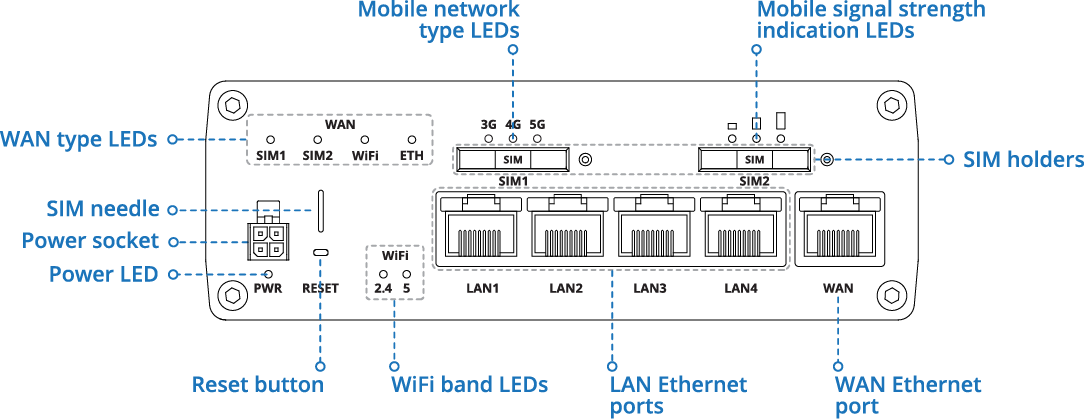
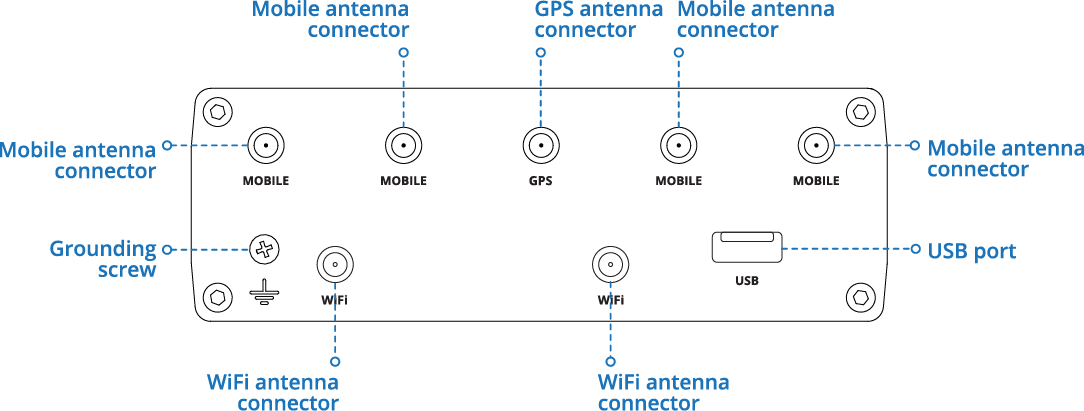
This Wiki page contains the online version of the '''Quick Start Guide (QSG)''' for the '''RUTX50 Router.''' Here you will find an overview of the various components on the front and back of a RUTX50 device, hardware installation instructions, first login information, device specifications, and general safety information. It is highly recommended to acquaint yourself with the Quick Start Guide before using the device. You can also locate a printed version of the Quick Start Guide in the packaging box of your device. | This Wiki page contains the online version of the '''Quick Start Guide (QSG)''' for the '''RUTX50 Router.''' Here you will find an overview of the various components on the front and back of a RUTX50 device, hardware installation instructions, first login information, device specifications, and general safety information. It is highly recommended to acquaint yourself with the Quick Start Guide before using the device. You can also locate a printed version of the Quick Start Guide in the packaging box of your device. | ||
| Line 5: | Line 12: | ||
<td style="border-bottom: 0px solid #e8e8e8; vertical-align: top; margin: 10px; padding-right: 50px;">__TOC__</td> | <td style="border-bottom: 0px solid #e8e8e8; vertical-align: top; margin: 10px; padding-right: 50px;">__TOC__</td> | ||
<td style="vertical-align: top; margin: 10px; padding-top: 25px; padding-right: 50px;">[[File: | <td style="vertical-align: top; margin: 10px; padding-top: 25px; padding-right: 50px;">[[File:RUTX50_Black_D1.png|right|210px]]</td> | ||
<td style="vertical-align: top; margin: 10px; padding-top: 75px; padding-right: 50px;">[[File: | <td style="vertical-align: top; margin: 10px; padding-top: 75px; padding-right: 50px;">[[File:RUTX50_Black_F1.png|right|210px]]</td> | ||
<td style="vertical-align: top; margin: 10px; padding-top: 75px; padding-right: 50px;">[[File: | <td style="vertical-align: top; margin: 10px; padding-top: 75px; padding-right: 50px;">[[File:RUTX50_Black_B1.png|right|210px]]</td> | ||
</tr> | </tr> | ||
</table> | </table> | ||
| Line 24: | Line 31: | ||
|- | |- | ||
|Max RF power | |Max RF power | ||
|24 dBm@WCDMA, 23 dBm@LTE, | |24 dBm@WCDMA, 26 dBm@LTE, 26 dBm@5G, 20 dBm@WiFi 2.4G, 23 dBm@WiFi 5G | ||
|- style="font-weight:bold;" | |||
| colspan="2" style="text-align:center;" | Bundled accessories specifications* | |||
|- | |||
|Power adapter | |||
|Input: 0.6 A@100-240 VAC, Output: 12 VDC, 1.5 A, 4-pin plug | |||
|- | |||
|Mobile antenna | |||
|617~960 / 1710~2690 / 3300~6000 MHz, 50 Ω, VSWR<3, gain** 4 dBi, omnidirectional, SMA male connector | |||
|- | |||
|GNSS antenna | |||
|1575.42~1602 MHz, 2.2~5 VDC, VSWR<1.5, active total gain** 28 dB (typ.), RHCP polarization, SMA male connector | |||
|- | |||
|WiFi antenna | |||
|2400~2500 MHz / 4950~5850 MHz, 50 Ω, VSWR<2, gain** 3 dBi, omnidirectional, RP-SMA male connector | |||
|} | |||
=== RUTX50 *3**** === | |||
{| class="wikitable" | |||
|- style="font-weight:bold;" | |||
! colspan="2" | Radio specifications | |||
|- | |||
|RF technologies | |||
|3G, 4G, 5G, GNSS, Wi-Fi 2.4 GHz: IEEE 802.11 b/g/n, Wi-Fi 5 GHz: IEEE 802.11 a/n/ac | |||
|- | |||
|Max RF power | |||
|25 dBm@WCDMA, 25 dBm@LTE, 28 dBm@LTE(HPUE:B38/41/42/43), 25 dBm@5G, 28 dBm@5G(HPUE:B38/41/77/78), 28 dBm@5G(MIMO:B38/40/41/77/78) 20 dBm@WiFi 2.4G, 23 dBm@WiFi 5G | |||
|- style="font-weight:bold;" | |- style="font-weight:bold;" | ||
| colspan="2" style="text-align:center;" | Bundled accessories specifications* | | colspan="2" style="text-align:center;" | Bundled accessories specifications* | ||
| Line 44: | Line 78: | ||
<small><nowiki>**</nowiki> Higher gain antenna can be connected to compensate for cable attenuation when a cable is used. The user is responsible for the compliance with the legal regulations.</small> | <small><nowiki>**</nowiki> Higher gain antenna can be connected to compensate for cable attenuation when a cable is used. The user is responsible for the compliance with the legal regulations.</small> | ||
RUTX50 router must be used in compliance with any and all applicable national and international laws and with any special restrictions regulating the utilization of the communication module in prescribed applications and environments. | RUTX50 router must be used in compliance with any and all applicable national and international laws and with any special restrictions regulating the utilization of the communication module in prescribed applications and environments. | ||
| Line 128: | Line 161: | ||
[[Image:Instructions_LOGO.png|50px]] This sign | [[Image:Instructions_LOGO.png|50px]] This sign means that is necessary to read the User's Manual before you start using the device. | ||
[[Image:WEEE_LOGO.png|50px]] This sign on the package means that all used electronic and electric equipment should not be mixed with general household waste. | [[Image:WEEE_LOGO.png|50px]] This sign on the package means that all used electronic and electric equipment should not be mixed with general household waste. | ||
| Line 178: | Line 211: | ||
|- | |- | ||
| B28 | | B28 | ||
| 703- | | 703-736, 758-791 MHz, 23 dBm | ||
|- | |- | ||
| rowspan="5" style="font-weight:bold;" | LTE-TDD | | rowspan="5" style="font-weight:bold;" | LTE-TDD | ||
| Line 216: | Line 249: | ||
|- | |- | ||
| n28 | | n28 | ||
| 703- | | 703-736, 758-791 MHz, 23 dBm | ||
|- | |- | ||
| n38 | | n38 | ||
| Line 256: | Line 289: | ||
| 1575.42, 1176.45 MHz | | 1575.42, 1176.45 MHz | ||
|- | |- | ||
| BDS Band | | BDS Band B1l | ||
| 1561.098 MHz | |||
|- | |||
| GLONASS Band G1 | |||
| 1602+n*0.5625 MHz | |||
|} | |||
=== RUTX50 *3**** === | |||
{| class="wikitable" | |||
|- | |||
! colspan="3" style="text-align:center; font-weight:bold;" | Operating Frequency / Maximum transmission power | |||
|- | |||
| rowspan="3" style="font-weight:bold;" | WCDMA | |||
| B1 | |||
| 1920-1980, 2110-2170 MHz, 25 dBm | |||
|- | |||
| B5<sup>1</sup> | |||
| 824-849, 869-894 MHz, 25 dBm | |||
|- | |||
| B8 | |||
| 880-915, 925-960 MHz, 25 dBm | |||
|- | |||
| rowspan="8" style="font-weight:bold;" | LTE-FDD | |||
| B1 | |||
| 1920-1980, 2110-2170 MHz, 25 dBm | |||
|- | |||
| B3 | |||
| 1710-1785, 1805-1880 MHz, 25 dBm | |||
|- | |||
| B5<sup>1</sup> | |||
| 824-849, 869-894 MHz, 25 dBm | |||
|- | |||
| B7 | |||
| 2500-2570, 2620-2690 MHz, 25 dBm | |||
|- | |||
| B8 | |||
| 880-915, 925-960 MHz, 25 dBm | |||
|- | |||
| B20 | |||
| 832-862, 791-821 MHz, 25 dBm | |||
|- | |||
| B28 | |||
| 703-748, 758-803 MHz, 25 dBm | |||
|- | |||
| B32(Downlink only) | |||
| 1452-1496 MHz | |||
|- | |||
| rowspan="5" style="font-weight:bold;" | LTE-TDD | |||
| B38 | |||
| 2570-2620 MHz, 28 dBm | |||
|- | |||
| B40 | |||
| 2300-2400 MHz, 28 dBm | |||
|- | |||
| B41<sup>2</sup> | |||
| 2496-2690 MHz, 28 dBm | |||
|- | |||
| B42<sup>2</sup> | |||
| 3400-3600 MHz, 28 dBm | |||
|- | |||
| B43<sup>2</sup> | |||
| 3600-3800 MHz, 28 dBm | |||
|- | |||
| rowspan="14" style="font-weight:bold;" | 5G NR (SA, NSA) | |||
| n1 | |||
| 1920-1680, 2110-2170 MHz, 25 dBm | |||
|- | |||
| n3 | |||
| 1710-1785, 1805-1880 MHz, 25 dBm | |||
|- | |||
| n5<sup>1</sup> | |||
| 824-849, 869-894 MHz, 25 dBm | |||
|- | |||
| n7 | |||
| 2500-2570, 2620-2690 MHz, 25 dBm | |||
|- | |||
| n8 | |||
| 880-915, 925-960 MHz, 25 dBm | |||
|- | |||
| n20 | |||
| 832-862, 791-821 MHz, 25 dBm | |||
|- | |||
| n28 | |||
| 703-748, 758-803 MHz, 25 dBm | |||
|- | |||
| n38 | |||
| 2570-2620 MHz, 25 dBm | |||
|- | |||
| n40 | |||
| 2300-2400 MHz, 25 dBm | |||
|- | |||
| n41 | |||
| 2496-2690 MHz, 28 dBm | |||
|- | |||
| n75(Downlink only) | |||
| 1432-1517 MHz | |||
|- | |||
| n76(Downlink only) | |||
| 1427-1432 MHz | |||
|- | |||
| n77 | |||
| 3300-4200 MHz, 28 dBm | |||
|- | |||
| n78 | |||
| 3300-3800 MHz, 28 dBm | |||
|- | |||
| style="font-weight:bold;" | Wi-Fi 2.4 GHz | |||
| colspan="2" | 2412-2472 MHz, 20 dBm | |||
|- | |||
| rowspan="4" style="font-weight:bold;" | Wi-Fi 5 GHz | |||
| UNII-1 Band 1 | |||
| 5180-5240 MHz, 23 dBm | |||
|- | |||
| UNII-2A Band 2 | |||
| 5260-5320 MHz, 30 dBm | |||
|- | |||
| UNII-2C Band 3 | |||
| 5500-5700 MHz, 30 dBm | |||
|- | |||
| UNII-3 Band 4 | |||
| 5745-5825 MHz, 13.98 dBm | |||
|- | |||
| rowspan="4" style="font-weight:bold;" | GNSS | |||
| GPS Band L1, L5 | |||
| 1575.42, 1176.45 MHz | |||
|- | |||
| Galileo Band E1, E5 | |||
| 1575.42, 1176.45 MHz | |||
|- | |||
| BDS Band B1l | |||
| 1561.098 MHz | | 1561.098 MHz | ||
|- | |- | ||
| Line 263: | Line 426: | ||
|} | |} | ||
<small>< | <small><sup>1</sup> – Not supported in Europe region.</small> | ||
<small><sup>2</sup> – Not supported in Europe and Oceania regions.</small> | |||
[[Image:Restrictions_LOGO.png|50px]] In all EU member states, operation of 5150-5350 MHz is restricted to indoor use only. | [[Image:Restrictions_LOGO.png|50px]] In all EU member states, operation of 5150-5350 MHz is restricted to indoor use only. | ||
| Line 271: | Line 435: | ||
=== Operating conditions === | === Operating conditions === | ||
---- | ---- | ||
* Operating temperature: -40° to + | * Operating temperature: -40° to +40° Celsius | ||
* Humidity should be in the range of 10% to 90% (non-condensing). Only use the device in dry environments. | * Humidity should be in the range of 10% to 90% (non-condensing). Only use the device in dry environments. | ||
* Out of direct sunlight | * Out of direct sunlight | ||
| Line 321: | Line 485: | ||
<br> | <br> | ||
[[File:RUTX50_Front_view_Schematics.png|center|800 px|link=Special:FilePath/RUTX50_Front_view_Schematics.png]] | |||
== Back view == | == Back view == | ||
<br> | <br> | ||
[[File:RUTX50_Back_view_Schematics.png|center|800 px|link=Special:FilePath/RUTX50_Back_view_Schematics.png]] | |||
== Connectors == | == Connectors == | ||
| Line 349: | Line 504: | ||
</tr> | </tr> | ||
</table> | </table> | ||
== Video Quick Start Guide == | |||
Need some help setting up your new Teltonika Networks RUTX50 Industrial 5G Router? Watch our quick start guide video and follow the step by step instructions to easily set up your new router for operation. | |||
<youtube>a5jLmUI_eWo</youtube> | |||
<br> | |||
== Hardware installation == | == Hardware installation == | ||
| Line 380: | Line 542: | ||
</table> | </table> | ||
= | {{Template: Configure_your_computer_LAN_Windows | ||
<!------------------------DEVICE-----------------------> | |||
| name = RUTX50 | |||
}} | |||
{{Template: Configure_your_computer_WiFi_Windows | |||
< | <!------------------------DEVICE-----------------------> | ||
| name = RUTX50 | |||
}} | |||
== Login to device == | == Login to device == | ||
| Line 426: | Line 576: | ||
* Industrial Grade SIM cards are recommended for devices requiring a long lifespan used in environments with '''extreme temperatures''', '''corrosive''' or '''extra humid climates''', or hard-to-reach locations. | * Industrial Grade SIM cards are recommended for devices requiring a long lifespan used in environments with '''extreme temperatures''', '''corrosive''' or '''extra humid climates''', or hard-to-reach locations. | ||
[[Category:RUTX50]] | [[Category: RUTX50]] | ||
Latest revision as of 12:55, 24 March 2025
Main Page > RUTX Routers > RUTX50 > QSG RUTX50 English English
|
 日本 日本
|
This Wiki page contains the online version of the Quick Start Guide (QSG) for the RUTX50 Router. Here you will find an overview of the various components on the front and back of a RUTX50 device, hardware installation instructions, first login information, device specifications, and general safety information. It is highly recommended to acquaint yourself with the Quick Start Guide before using the device. You can also locate a printed version of the Quick Start Guide in the packaging box of your device.
 |
 |
 |
Safety information
Before starting operating the device, please review recommendations and precautions to minimize the possibility of accidents. Safety precautions presented are supplementary and subject to the local safety regulations. When various operations are executed on the device, the user must fully follow the safety instructions and recommendations provided with the device.
General
| Radio specifications | |
|---|---|
| RF technologies | 3G, 4G, 5G, GNSS, Wi-Fi 2.4 GHz: IEEE 802.11 b/g/n, Wi-Fi 5 GHz: IEEE 802.11 a/n/ac |
| Max RF power | 24 dBm@WCDMA, 26 dBm@LTE, 26 dBm@5G, 20 dBm@WiFi 2.4G, 23 dBm@WiFi 5G |
| Bundled accessories specifications* | |
| Power adapter | Input: 0.6 A@100-240 VAC, Output: 12 VDC, 1.5 A, 4-pin plug |
| Mobile antenna | 617~960 / 1710~2690 / 3300~6000 MHz, 50 Ω, VSWR<3, gain** 4 dBi, omnidirectional, SMA male connector |
| GNSS antenna | 1575.42~1602 MHz, 2.2~5 VDC, VSWR<1.5, active total gain** 28 dB (typ.), RHCP polarization, SMA male connector |
| WiFi antenna | 2400~2500 MHz / 4950~5850 MHz, 50 Ω, VSWR<2, gain** 3 dBi, omnidirectional, RP-SMA male connector |
RUTX50 *3****
| Radio specifications | |
|---|---|
| RF technologies | 3G, 4G, 5G, GNSS, Wi-Fi 2.4 GHz: IEEE 802.11 b/g/n, Wi-Fi 5 GHz: IEEE 802.11 a/n/ac |
| Max RF power | 25 dBm@WCDMA, 25 dBm@LTE, 28 dBm@LTE(HPUE:B38/41/42/43), 25 dBm@5G, 28 dBm@5G(HPUE:B38/41/77/78), 28 dBm@5G(MIMO:B38/40/41/77/78) 20 dBm@WiFi 2.4G, 23 dBm@WiFi 5G |
| Bundled accessories specifications* | |
| Power adapter | Input: 0.6 A@100-240 VAC, Output: 12 VDC, 1.5 A, 4-pin plug |
| Mobile antenna | 617~960 / 1710~2690 / 3300~6000 MHz, 50 Ω, VSWR<3, gain** 4 dBi, omnidirectional, SMA male connector |
| GNSS antenna | 1575.42~1602 MHz, 2.2~5 VDC, VSWR<1.5, active total gain** 28 dB (typ.), RHCP polarization, SMA male connector |
| WiFi antenna | 2400~2500 MHz / 4950~5850 MHz, 50 Ω, VSWR<2, gain** 3 dBi, omnidirectional, RP-SMA male connector |
* Order code dependant.
** Higher gain antenna can be connected to compensate for cable attenuation when a cable is used. The user is responsible for the compliance with the legal regulations.
RUTX50 router must be used in compliance with any and all applicable national and international laws and with any special restrictions regulating the utilization of the communication module in prescribed applications and environments.
CE Declaration of Conformity
| [BG] Bulgarian | С настоящето, TELTONIKA NETWORKS декларира, че RUTX50 е в съответствие със съществените изисквания и другитеприложими разпоредби на Директива 2014/53/EU |
| [HR] Croatian | Ovim TELTONIKA NETWORKS izjavljuje da je ovaj RUTX50 u skladu s bitnim zahtjevima i ostalim relevantnim odredbama Direktive 2014/53/EU |
| [CZ] Czech | TELTONIKA NETWORKS tímto prohlašuje, že RUTX50 splňuje základní požadavky a všechna příslušná ustanoveni Směrnice 2014/53/EU |
| [DK] Danish | Undertegnede TELTONIKA NETWORKS erklærer herved, at følgende udstyr RUTX50 overholder de væsentlige krav og øvrige relevante krav i direktiv 2014/53/EU |
| [NL] Dutch | Hierbij verklaart TELTONIKA NETWORKS dat het toestel I RUTX50 in overeenstemming is met de essentiële eisen en de andere relevante bepalingen van richtlijn 2014/53/EU |
| [EE] Estonian | Käesolevaga kinnitab TELTONIKA NETWORKS seadme RUTX50 vastavust direktiivi 2014/53/EU põhinõuetele ja nimetatud direktiivist tulenevatele teistele asjakohastele sätetele |
| [FI] Finish | TELTONIKA NETWORKS vakuuttaa täten että RUTX50 tyyppinen laite on direktiivin 2014/53/EU oleellisten vaatimusten ja sitä koskevien direktiivin muiden ehtojen mukainen |
| [FR] French | TELTONIKA NETWORKS déclare que cette RUTX50 est conforme aux exigences essentielles et aux autres dispositions pertinentes de la directive 2014/53/EU |
| [DE] German | Hiermit erklärt TELTONIKA NETWORKS, dass dieser RUTX50 den grundlegenden Anforderungen und anderen relevanten Bestimmungen der Richtlinie 2014/53/EU entspricht |
| [GR] Greek | ΜΕ ΤΗΝ ΠΑΡΟΥΣΑ Ο ΚΑΤΑΣΚΕΥΑΣΤΗΣ TELTONIKA NETWORKS ΔΗΛΩΝΕΙ ΟΤΙ RUTX50 ΣΥΜΜΟΡΦΩΝΕΤΑΙ ΠΡΟΣ ΤΙΣ ΟΥΣΙΩΔΕΙΣ ΑΠΑΙΤΗΣΕΙΣ ΚΑΙ ΤΙΣ ΛΟΙΠΕΣ ΣΧΕΤΙΚΕΣ ΔΙΑΤΑΞΕΙΣ ΤΗΣ ΟΔΗΓΙΑΣ 2014/53/EU |
| [HU] Hungarian | A TELTONIKA NETWORKS ezzennel kijelenti, hogy a RUTX50 típusú berendezés teljesíti az alapvető követelményeket és más 2014/53/EU irányelvben meghatározott vonatkozó rendelkezéseket |
| [IE] Irish | Leis seo, dearbhaíonn TELTONIKA NETWORKS go gcomhlíonann an RUTX50 seo bunriachtanais agus forálacha ábhartha eile Threoir 2014/53/EU |
| [IT] Italian | Con la presente, TELTONIKA NETWORKS dichiara che questo RUTX50 è conforme ai requisiti essenziali e ad altre disposizioni pertinenti della Direttiva 2014/53/EU |
| [LV] Latvian | Ar šo TELTONIKA NETWORKS deklarē, ka RUTX50 atbilst Direktīvas 2014/53/EU būtiskajām prasībām un citiem ar to saistītajiem noteikumiem |
| [LT] Lithuanian | Šiuo dokumentu UAB TELTONIKA NETWORKS deklaruoja, kad šis RUTX50 atitinka esminius reikalavimus ir kitas 2014/53/EU Direktyvos nuostatas |
| [MT] Maltese | Hawnhekk, TELTONIKA NETWORKS tiddikjara li dan l-RUTX50 huwa konformi mar-rekwiżiti essenzjali u dispożizzjonijiet rilevanti oħra tad Direttiva 2014/53/EU |
| [NO] Norwegian | TELTONIKA NETWORKS Erklærer herved at RUTX50 er i samsvar med de grunnleggende krav og øvrige relevante krav i direktiv 2014/53/EU |
| [PL] Polish | Niniejszym TELTONIKA NETWORKS deklaruje że RUTX50 jest zgodny z zasadniczymi wymaganiami i innymi właściwymi postanowieniami Dyrektywy 2014/53/EU |
| [PT] Portuguese | Eu, TELTONIKA NETWORKS declaro que o RUTX50 cumpre os requisitos essenciais e outras provisões relevantes da Directiva 2014/53/EU |
| [RO] Romanian | Prin prezenta, TELTONIKA NETWORKS declară că aparatul RUTX50 este în conformitate cu cerinţele esenţiale şi cu alte prevederi pertinente ale Directivei 2014/53/EU |
| [SK] Slovak | Spoločnosť TELTONIKA NETWORKS týmto vyhlasuje, že smerovač RUTX50 je v súlade so základnými požiadavkami a ďalšími príslušnými ustanoveniami smernice 2014/53/EU |
| [SI] Slovenian | TELTONIKA NETWORKS izjavlja, da je ta RUTX50 v skladu z bistvenimi zahtevami in drugimi relevantnimi določili direktive 2014/53/EU |
| [ES] Spanish | Por la presente, TELTONIKA NETWORKS declara que este RUTX50 cumple con los requisitos esenciales y otras exigencias relevantes de la Directiva 2014/53/EU |
| [SE] Swedish | Härmed intygar TELTONIKA NETWORKS att denna RUTX50 är i överensstämmelse med de väsentliga egenskapskrav och övriga relevanta bestämmelser som framgår av direktiv 2014/53/EU |
Detailed compliance information is available at the following internet address: wiki.teltonika-networks.com/view/Certificates.
 This sign means that is necessary to read the User's Manual before you start using the device.
 This sign on the package means that all used electronic and electric equipment should not be mixed with general household waste.
 Hereby, TELTONIKA NETWORKS declares that this RUTX50 is in compliance with the essential requirements and other relevant provisions of Directive 2014/53/EU. The full text of the EU declaration of conformity is available at the following internet address: https://wiki.teltonika-networks.com/view/RUTX50_CE/RED
 Hereby, TELTONIKA NETWORKS declares that the radio equipment type RUTX50 is in compliance with Radio Equipment Regulations 2017. The full text of the UK declaration of conformity is available at the following internet address: https://wiki.teltonika-networks.com/view/RUTX50_UKCA
RF exposure
This device meets the official requirements for exposure to radio waves. This device is designed and manufactured not to exceed the emission limits for exposure to radio frequency (RF) energy set by authorized agencies. The device must be used with a minimum separation of 20 cm from a person’s body to ensure compliance with RF exposure guidelines. Failure to observe these instructions could result in your RF exposure exceeding the applicable limits.
External antennas used with RUTX50 must be installed to provide a distance of at least 20 cm from any people and must not be co-located or operated in conjunction with any other antenna or transmitter.
Any external antenna gain must meet RF exposure and maximum radiated output power limits of the applicable rule section.
| Operating Frequency / Maximum transmission power | ||
|---|---|---|
| WCDMA | B1 | 1920-1980, 2110-2170 MHz, 24 dBm |
| B51 | 824-849, 869-894 MHz, 24 dBm | |
| B8 | 880-915, 925-960 MHz, 24 dBm | |
| LTE-FDD | B1 | 1920-1980, 2110-2170 MHz, 23 dBm |
| B3 | 1710-1785, 1805-1880 MHz, 23 dBm | |
| B51 | 824-849, 869-894 MHz, 24 dBm | |
| B7 | 2500-2570, 2620-2690 MHz, 24 dBm | |
| B8 | 880-915, 925-960 MHz, 23 dBm | |
| B20 | 832-862, 791-821 MHz, 23 dBm | |
| B28 | 703-736, 758-791 MHz, 23 dBm | |
| LTE-TDD | B38 | 2570-2620 MHz, 23 dBm |
| B40 | 2300-2400 MHz, 23 dBm | |
| B412 | 2300-2400 MHz, 23 dBm | |
| B42 | 3400-3600 MHz, 26 dBm | |
| B43 | 3600-3800 MHz, 26 dBm | |
| 5G NR (SA, NSA) | n1 | 1920-1680, 2110-2170 MHz, 23 dBm |
| n3 | 1710-1785, 1805-1880 MHz, 23 dBm | |
| n51 | 824-849, 869-894 MHz, 23 dBm | |
| n7 | 2500-2570, 2620-2690 MHz, 23 dBm | |
| n8 | 880-915, 925-960 MHz, 23 dBm | |
| n20 | 832-862, 791-821 MHz, 23 dBm | |
| n28 | 703-736, 758-791 MHz, 23 dBm | |
| n38 | 2570-2620 MHz, 23 dBm | |
| n40 | 2300-2400 MHz, 23 dBm | |
| n41 | 2496-2690 MHz, 26 dBm | |
| n77 | 3300-4200 MHz, 26 dBm | |
| n78 | 3300-3800 MHz, 26 dBm | |
| Wi-Fi 2.4 GHz | 2412-2472 MHz, 20 dBm | |
| Wi-Fi 5 GHz | UNII-1 Band 1 | 5180-5240 MHz, 23 dBm |
| UNII-2A Band 2 | 5260-5320 MHz, 30 dBm | |
| UNII-2C Band 3 | 5500-5700 MHz, 30 dBm | |
| UNII-3 Band 4 | 5745-5825 MHz, 13.98 dBm | |
| GNSS | GPS Band L1, L5 | 1575.42, 1176.45 MHz |
| Galileo Band E1, E5 | 1575.42, 1176.45 MHz | |
| BDS Band B1l | 1561.098 MHz | |
| GLONASS Band G1 | 1602+n*0.5625 MHz | |
RUTX50 *3****
| Operating Frequency / Maximum transmission power | ||
|---|---|---|
| WCDMA | B1 | 1920-1980, 2110-2170 MHz, 25 dBm |
| B51 | 824-849, 869-894 MHz, 25 dBm | |
| B8 | 880-915, 925-960 MHz, 25 dBm | |
| LTE-FDD | B1 | 1920-1980, 2110-2170 MHz, 25 dBm |
| B3 | 1710-1785, 1805-1880 MHz, 25 dBm | |
| B51 | 824-849, 869-894 MHz, 25 dBm | |
| B7 | 2500-2570, 2620-2690 MHz, 25 dBm | |
| B8 | 880-915, 925-960 MHz, 25 dBm | |
| B20 | 832-862, 791-821 MHz, 25 dBm | |
| B28 | 703-748, 758-803 MHz, 25 dBm | |
| B32(Downlink only) | 1452-1496 MHz | |
| LTE-TDD | B38 | 2570-2620 MHz, 28 dBm |
| B40 | 2300-2400 MHz, 28 dBm | |
| B412 | 2496-2690 MHz, 28 dBm | |
| B422 | 3400-3600 MHz, 28 dBm | |
| B432 | 3600-3800 MHz, 28 dBm | |
| 5G NR (SA, NSA) | n1 | 1920-1680, 2110-2170 MHz, 25 dBm |
| n3 | 1710-1785, 1805-1880 MHz, 25 dBm | |
| n51 | 824-849, 869-894 MHz, 25 dBm | |
| n7 | 2500-2570, 2620-2690 MHz, 25 dBm | |
| n8 | 880-915, 925-960 MHz, 25 dBm | |
| n20 | 832-862, 791-821 MHz, 25 dBm | |
| n28 | 703-748, 758-803 MHz, 25 dBm | |
| n38 | 2570-2620 MHz, 25 dBm | |
| n40 | 2300-2400 MHz, 25 dBm | |
| n41 | 2496-2690 MHz, 28 dBm | |
| n75(Downlink only) | 1432-1517 MHz | |
| n76(Downlink only) | 1427-1432 MHz | |
| n77 | 3300-4200 MHz, 28 dBm | |
| n78 | 3300-3800 MHz, 28 dBm | |
| Wi-Fi 2.4 GHz | 2412-2472 MHz, 20 dBm | |
| Wi-Fi 5 GHz | UNII-1 Band 1 | 5180-5240 MHz, 23 dBm |
| UNII-2A Band 2 | 5260-5320 MHz, 30 dBm | |
| UNII-2C Band 3 | 5500-5700 MHz, 30 dBm | |
| UNII-3 Band 4 | 5745-5825 MHz, 13.98 dBm | |
| GNSS | GPS Band L1, L5 | 1575.42, 1176.45 MHz |
| Galileo Band E1, E5 | 1575.42, 1176.45 MHz | |
| BDS Band B1l | 1561.098 MHz | |
| GLONASS Band G1 | 1602+n*0.5625 MHz | |
1 – Not supported in Europe region.
2 – Not supported in Europe and Oceania regions.
 In all EU member states, operation of 5150-5350 MHz is restricted to indoor use only.
Operating conditions
- Operating temperature: -40° to +40° Celsius
- Humidity should be in the range of 10% to 90% (non-condensing). Only use the device in dry environments.
- Out of direct sunlight
- Away from heat source, corrosive substances, salts, and flammable gases
Attention: operation outside the permissible range can considerably shorten the service life of the device.
Faulty and damaged products
- Do not attempt to disassemble the device or its accessories.
- Only qualified personnel must service or repair the device or its accessories.
- If your device or its accessories have been submerged in water punctured or subjected to a severe fall, do not use until they have been checked at an authorized service center.
Electrical safety
- Only use approved accessories.
- Do not connect with incompatible products or accessories.
- It is recommended to ground devices with grounding terminals before connecting them to power. Failure to ground appropriately might result in a shock hazard. The cross-sectional area of the protective grounding conductor should be at least 1mm2.
Product handling
- You alone are responsible for how you use your device and any consequences related to its use.
- Use of your device is subject to safety measures designed to protect users and their environment.
- Always treat your device and its accessories with care and keep it in a clean and dust-free place.
- Do not expose your device or its accessories to open flames, lit tobacco products, liquid, moisture, or high humidity.
- Do not drop, throw or try to bend your device or its accessories.
- Do not use harsh chemicals, cleaning solvents, or aerosols to clean the device or its accessories.
- Do not paint your device or its accessories.
- Do not attempt to disassemble your device (exemptions for devices that require disassembly for SIM insertion) or its accessories: it does not contain any user-serviceable parts. For safety reasons, the equipment should be opened only by qualified personnel.
- Make sure to use ESD personal protective equipment while the equipment is serviced.
- Do not use your device in an enclosed environment where heat dissipation is poor.
- Prolonged use in such space may cause excessive heat and raise ambient temperature, which will lead to the automatic shutdown of your device or the disconnection of the mobile network connection for your safety. To use your device again after such a shutdown, cool it in a well-ventilated place before turning it on.
- Please check all national laws and local regulations for the disposal of electronic products.
- Do not operate the device where ventilation is restricted.
- Do not use or install this product near water to avoid fire or shock hazards.
- Avoid exposing the equipment to rain or damp areas.
- Arrange power and Ethernet cables so that they are not likely to be stepped on or have items placed on them.
- Ensure that the voltage and the rated current of the power source match the device’s requirements. Do not connect the device to an inappropriate power source.
- During a thunderstorm, no operations should be carried out on the device and cables.
- The unit must be powered off where blasting is in progress and explosive atmospheres are present or near medical life support equipment.
- Do not leave your device and its accessories within reach of small children or allow them to play with it. They could hurt themselves or others and could accidentally damage the device. Your device contains small parts with sharp edges that may cause an injury choking hazard.
- Like any wireless device, this device operates using radio signals, which cannot guarantee connection in all conditions. Therefore, you must never rely solely on any wireless device for emergency communications or otherwise use the device in situations where the interruption of data connectivity could lead to death, personal injury, property damage, data, or other loss.
- The device may become warm during regular use.
Front view
Back view
Connectors
POWER SOCKET PINOUT
 |
 |
Video Quick Start Guide
Need some help setting up your new Teltonika Networks RUTX50 Industrial 5G Router? Watch our quick start guide video and follow the step by step instructions to easily set up your new router for operation.
Hardware installation
 |
 |
 |
 |
 |
 |
 |
 |
 |
Configure your computer LAN (Windows)
| 1. Ensure the Network connection is Enabled. Go to Start — Control Panel — Network and Internet — Network and Sharing Center. Click on the Change adapter settings in the left panel, then right-click on Network Adapter, and select Enable. |  |
| 2. Check if IP and DNS are obtained automatically. Right-click on Network Adapter and select Properties. Then select Internet Protocol Version 4 and click Properties.
3. If not selected, check to obtain an IP address and obtain DNS server address automatically. Click OK. |
 |
Configure your computer Wi-Fi (Windows)
| 1. Ensure the Wireless network connection is Enabled. Go to Start — Control Panel — Network and Internet — Network and Sharing Center. Click on the Change adapter settings in the left panel, then right-click on Wireless Network Adapter, and select Enable. |  |
| 2. Check if IP and DNS are obtained automatically. Right-click on Wireless Network Adapter and select Properties. Then select Internet Protocol Version 4 and click Properties.
3. If not selected, check to obtain an IP address and obtain DNS server address automatically. Click OK. |
|
| 4. Connect to a wireless network by right-clicking on Wireless Network Adapter and selecting Connect. |  |
| 5. Choose the wireless network RUTX50 **** from the list and click Connect. Enter the Wi-Fi password located on the device's label. |  |
Login to device
| 1. To enter the router's Web interface (WebUI), type http://192.168.1.1 into the URL field of your Internet browser. 2. When prompted for authentication enter the username admin and enter the password located on the device information label/engraving. |
 |
| 3. After logging in, you must set a new password for security reasons. You will not be able to interact with the router’s WebUI until the default password is changed. The new password must consist of a minimum of 8 characters. Requirements: one uppercase letter, one lowercase letter, and one digit. 4. Next, the Configuration Wizard will start to help you set up some of the router's main operational parameters. 5. Finally, let's verify the Mobile signal strength. Go to the Status — Network page and pay attention to the Signal Strength indication.
|
 |
SIM card recommendations
- Before installing the SIM cards, please apply a thin layer of dielectric grease to the SIM card contacts for devices used in environments with high-vibration levels. This will help avoid SIM cards losing touch with the SIM slot and prevent unexpected failures.
- Industrial Grade SIM cards are recommended for devices requiring a long lifespan used in environments with extreme temperatures, corrosive or extra humid climates, or hard-to-reach locations.