
TRB143 Product Change Notifications: Difference between revisions
No edit summary |
No edit summary |
||
| (16 intermediate revisions by 3 users not shown) | |||
| Line 1: | Line 1: | ||
{{Template:pcn intro | |||
| name = TRB143 | |||
| series = TRB1xx | |||
| firmware = TRB1xx Firmware | |||
}} | |||
__TOC__ | |||
{{Template:PCN_jp_region_antenna_2025_08 | |||
| name = TRB143 | |||
| date = 2025.08.21 | |||
| quarter = Q4 2025 | |||
| PCN_date = 2025_08_21 | |||
| code_name = TRB143 4***** | |||
| order_code = | |||
| order_code_changes_data = No changes | |||
| change_type = Accessory mechanical reliability enhancement | |||
| change_reasons = Product improvement | |||
| rev = 6 | |||
}} | |||
== | {{Template:PCN_transition_to_https | ||
| name = TRB143 | |||
| date = 2025.04.22 | |||
| quarter = Q2 2025 | |||
| PCN_number = PCN_Transition_HTTPS_TRB143_2025_04_22 | |||
| code_name = All | |||
| RutOS = 7.15 | |||
| order_code_changes_data = No changes | |||
| order_code = | |||
}} | |||
{{Template:PCN_RUTOS_7.14_Post/GET_Removal | |||
---- | <!------------------------DEVICE-----------------------> | ||
| name = TRB143 | |||
}} | |||
|} | |||
< | {{Template:PCN_read_only_system_files | ||
<!------------------------DEVICE-----------------------> | |||
| name = TRB143 | |||
| date = 2025.02.24 | |||
| quarter = Q2 2025 | |||
| PCN_number = PCN_read_only_system_TRB143_2025_02_24 | |||
| code_name = All | |||
<!-- Or use: New Order codes --> | |||
| RutOS = 7.14 | |||
| order_code_changes_data = No changes | |||
| order_code = | |||
}} | |||
{{Template:PCN_WebUI_Mode_Update_with_RutOS_7.13 | |||
<!------------------------DEVICE-----------------------> | |||
| name = TRB143 | |||
}} | |||
== 2025.01.22: Accessory mobile SMA replacement == | |||
Starting from 2025 Q1, for specific order codes the product <nowiki>accessory</nowiki> mobile SMA antenna in the standard package will be replaced. | |||
{| class="wikitable" | |||
{| class="wikitable" | |||
|- | |- | ||
| style=" | | style="width: 1219px; text-align: left; background: #eeece1;" | PCN Number: PCN_SMA_antenna_Accessory_change_2025_01_22_EN | ||
|- | |- | ||
| style=" | |} | ||
{| class="wikitable" | |||
|+ | |||
! style="text-align: left; background: #eeece1;" colspan="3" | Change description | |||
|- | |- | ||
| style=" | | style="text-align: left; background: white;" | Change type | ||
| | | style="text-align: left; background: white;" colspan="2" | Replacement | ||
|- | |- | ||
| style=" | | style="width: 221px; text-align: left; background: white;" rowspan="2" | Detailed description | ||
| | | style="width: 908px; text-align: left; background: white;" colspan="2" | Starting from 2025 Q1, for specific order codes (listed below), the product accessory mobile SMA antenna in the standard package is replaced with a mobile SMA antenna from a different manufacturer. | ||
|- | |- | ||
| style=" | | style="text-align: left; background: white;" colspan="2" | | ||
| | |||
{| class="wikitable" | |||
|+ | |||
! style="text-align: left; background: #eeece1;" colspan="3" | Specification Comparison | |||
|- | |- | ||
| style=" | ! style="text-align: left; background: white;" | Parameter | ||
| | ! style="text-align: left; background: white;" | Previous | ||
! style="text-align: left; background: white;" | Current | |||
|- | |- | ||
| | | Frequency range | ||
| | | 698 ~ 960, 1710 ~ 2690 MHz | ||
| 600 ~ 2700 MHz | |||
|- | |- | ||
| | | Polarization | ||
| | | Linear (vertical) | ||
| Linear | |||
|- | |- | ||
| | | Gain | ||
| | | 4.0 dBi | ||
| ≤ 2.9 dBi | |||
|- | |- | ||
| | | VSWR | ||
| | | 3.0 | ||
| ≤ 4.7 | |||
|- | |- | ||
| | | Impedance | ||
| | | 50 Ω | ||
| 50 Ω | |||
|- | |- | ||
| | | Connector type | ||
| | | SMA Male | ||
| SMA Male | |||
|- | |- | ||
| | | Operating temperature | ||
| | | –40 °C ~ +85 °C | ||
| -20 °C to +70 °C | |||
|- | |- | ||
| | | RoHS compliant | ||
| | | ✓ | ||
| ✓ | |||
|- | |- | ||
| | | Weight | ||
| | | 20 g | ||
| 19.5 g | |||
|} | |||
|- | |- | ||
| style=" | | style="text-align: left; background: white;" | Change reasons | ||
| | | style="text-align: left; background: white;" colspan="2" | Reducing product lead times | ||
|- | |- | ||
| style=" | |} | ||
{| class="wikitable" | |||
|+ | |||
! style="text-align: left; background: #eeece1;" colspan="3" | Affected products information | |||
|- | |- | ||
| style=" | | style="width: 221px; text-align: left; background: white;" | Affected Order Codes | ||
| | | style="text-align: left; background: white;" | | ||
* RUT2410340H0 | |||
* RUT241087000 | |||
* TRB245400800 | |||
* TRB14040C400 | |||
* TRB14140A300 | |||
* TRB14240A700 | |||
* TRB143400300 | |||
* TRB143400400 | |||
* TRB14540A300 | |||
* RUT951900A00 | |||
* RUT956900C00 | |||
* RUT956900D00 | |||
|- | |- | ||
| style=" | | style="text-align: left; background: white;" | Upcoming change date | ||
| | | style="text-align: left; background: white;" colspan="2" | 2025 Q1 | ||
|- | |- | ||
| style=" | |} | ||
{| class="wikitable" | |||
|+ | |||
! style="text-align: left; background: #eeece1;" colspan="3" | Change impact | |||
|- | |- | ||
| style=" | | style="width: 221px; text-align: left; background: white;" | Risk assessment | ||
| | | style="width: 908px; text-align: left; background: white;" colspan="2" | No risk factors encountered with this change. | ||
|- | |- | ||
| style=" | | style="text-align: left; background: white;" | Suggested implementation plan | ||
| | | style="text-align: left; background: white;" colspan="2" | No implementation plan needed. | ||
|- | |- | ||
|} | |} | ||
{| class="wikitable" | {| class="wikitable" | ||
! colspan=" | |+ | ||
! style="width: 1141px; text-align: left; background: #eeece1;" colspan="3" | Acknowledgement of PCN receipt | |||
|- | |- | ||
| | | style="text-align: left; background: white;" colspan="3"| If no feedback is received within two weeks after the issue date of this notification - Teltonika may accept that this change has been tacitly accepted and can implement the change as indicated above. | ||
| | |||
|- | |- | ||
|} | |} | ||
To download the pdf version of this notification, [[Media:PCN_SMA_antenna_Accessory_change_2025_01_22_EN_v1.pdf|click here]]. | |||
[[ | |||
{{Template:Device_Housing_Sticker_Visual_Changes | |||
<!------------------------DEVICE-----------------------> | |||
| name = TRB143 | |||
| FullDate = 2024.11.22 | |||
| month = December | |||
| year = 2024 | |||
| day = 1 | |||
}} | |||
= | {{Template:EAN code changes | ||
<!------------------------DEVICE-----------------------> | |||
| name = TRB143 | |||
}} | |||
{{Template:2023 12 18 PCN Housing | |||
< | <!------------------------DEVICE-----------------------> | ||
| name = TRB143 | |||
| type = gateway | |||
| year = 2024 | |||
| month = November | |||
| Full_date = 2024.09.18 | |||
| File_Full_date = 2024_09_18 | |||
}} | |||
{{Template:PCN_SMA_Changes | |||
<!------------------------DEVICE-----------------------> | |||
| name = TRB143 | |||
| month = August | |||
| date = 2024.05.15 | |||
| filedate = 2024_05_15 | |||
}} | |||
{{Template:PCN_RutOS_7.7 | |||
< | <!------------------------DEVICE-----------------------> | ||
| name = TRB143 | |||
}} | |||
= | {{Template: 2023-10-16_TRB_Firmware_Requirement_Change | ||
<!------------------------DEVICE-----------------------> | |||
| name = TRB143 | |||
}} | |||
{{Template:MAC Address Range Change PCN}} | |||
[[Category:TRB143]] | [[Category:TRB143]] | ||
Latest revision as of 14:26, 21 August 2025
Main Page > TRB Gateways > TRB143 > TRB143 Product Change NotificationsProduct change notifications (PCN) is a way of informing customers of upcoming changes related to Teltonika Networks products. This includes outward appearance adjustments, hardware improvements, changes to package contents, etc. Changes related to a product's firmware are not included in PCNs (click here to see the firmware changelog).
This page stores information regarding changes to the TRB143 device. Below you will find a list of both upcoming and already implemented changes sorted by newest to oldest (top to bottom).
2025.08.21: Mobile antenna change
Starting from Q4 2025, TRB143 4***** order codes for the accessory mobile antenna for TRB143 will transition from a magnetic-only base to a magnetic base with a pre-applied 3M adhesive sticker to improve vibration protection.
| PCN Number: PCN_TRB143_Antenna_Adhesive_2025_08_21 |
| Change description | |
|---|---|
| Change type | Accessory mechanical reliability enhancement |
| Detailed description |
Recommendations for application: clean the surface, peel the liner from the pre-applied adhesive, mount the antenna with firm, even pressure, and allow the recommended cure time; contact your sales representative if needed. Please note that this change will be implemented gradually, throughout a 3-month transitional period starting from Q4 2025. During this period, your shipments may consist of either the previous version or the new one described above. |
| Change reasons | Product improvement |
| Affected products information | ||
|---|---|---|
| Model | Affected order codes | Order code changes |
| TRB143 | TRB143 4***** | No changes |
| Upcoming change date | Q4 2025 | |
| Change impact | ||
|---|---|---|
| Risk assessment |
| |
| Suggested implementation plan |
Information included in this PCN will help adapt to the upcoming changes. For more detailed information, please contact your sales representative.
| |
| Acknowledgement of PCN receipt | ||
|---|---|---|
| If no feedback is received within two weeks after the issue date of this notification, Teltonika may accept that this change has been tacitly accepted and can implement the change as indicated above. |
To download the PDF version of this notification, click here.
2025.04.22: Transition to HTTPS protocol RutOS 7.15
With the release of RutOS version 7.15 in Q2 2025, TRB143 devices will disable the HTTP protocol and enable HTTPS Redirect by default to enhance WebUI and API communication security.
| PCN Number: PCN_Transition_HTTPS_TRB143_2025_04_22 |
| Change description | |
|---|---|
| Change type | RutOS Security Enhancement |
| Detailed description | With the release of RutOS version 7.15 firmware, the device's WebUI and API default communication methods will change. The HTTP protocol will be changed to HTTPS (only) in default configuration for security reasons and complying with security standards. The "HTTPS Redirect" functionality will be enabled by default so all HTTP requests will be automatically redirected through the HTTPS channel. |
| Change reasons | To enhance security measures and comply with security standards by eliminating unsecured HTTP protocol usage. |
| Affected products information | ||
|---|---|---|
| Model | Affected order codes | Order code changes |
| TRB143 | All | No changes |
| Upcoming change date | Q2 2025 | |
| Change impact | ||
|---|---|---|
| Risk assessment |
| |
| Suggested implementation plan | ||
| Acknowledgement of PCN receipt | ||
|---|---|---|
| If no feedback is received within two weeks after the issue date of this notification, Teltonika may accept that this change has been tacitly accepted and can implement the change as indicated above. |
To download the PDF version of this notification, click here.
2025.02.25: Mobile and I/O POST/GET Service Removal with RutOS 7.14
With the release of RutOS version 7.14, support for the TRB143 POST/GET service will be discontinued to enhance security while maintaining device functionality through alternative methods.
| PCN Number: PCN_RUTOS 7.14_POST_GET_Removal_TRB143_2025_02_25_EN |
| Change description | |
|---|---|
| Change type | Firmware change |
| Detailed description | With the introduction of RutOS 7.14, the Mobile POST/GET and I/O POST/GET services will be removed from the firmware and will no longer be available in the package manager. These legacy services had security concerns, and their removal ensures a more robust security framework for the device. However, users will still be able to achieve the same functionalities using the device's API, which provides a more secure and efficient way to interact with the system. |
| Change reasons |
|
| Affected products information | ||
|---|---|---|
| Model | Affected order codes | Order code changes |
| TRB143 | TRB143 ****** | No changes |
| Upcoming change date | 2025 Q2, with the release of RutOS 7.14 | |
| Change impact | ||
|---|---|---|
| Risk assessment |
| |
| Suggested implementation plan |
Information included in this PCN will help adapt to the upcoming changes. For more detailed information, please contact your sales representative. | |
| Acknowledgement of PCN receipt | ||
|---|---|---|
| If no feedback is received within two weeks after the issue date of this notification - Teltonika may accept that this change has been tacitly accepted and can implement the change as indicated above. |
To download the pdf version of this notification, click here.
2025.02.24: Implementation of Read-Only System Files in RutOS 7.14
With the release of RutOS version 7.14 in Q2 2025, in TRB143 devices will implement read-only permissions for critical system files by default. The new read-only configuration ensures a more secure and stable environment, though it may affect those who perform non-standard operations.
| PCN Number: PCN_read_only_system_TRB143_2025_02_24 |
| Change description | |
|---|---|
| Change type | RutOS System Integrity Enhancement |
| Detailed description | With the release of RutOS version 7.14, the device’s critical system files will become read-only by default. This prevents unauthorized or accidental modifications that could damage the system’s integrity. Standard users operating within typical parameters should not be affected, while those who rely on direct file alterations will need to adjust their workflows. Custom firmware options are expected to allow reverting to a more flexible configuration if required. |
| Change reasons | To maintain system integrity, enhance reliability, and prevent unintended damage to core files. |
| Affected products information | ||
|---|---|---|
| Model | Affected order codes | Order code changes |
| TRB143 | TRB143 ****** | No changes |
| Upcoming change date | Q2 2025 | |
| Change impact | ||
|---|---|---|
| Risk assessment |
| |
| Suggested implementation plan |
| |
| Acknowledgement of PCN receipt | ||
|---|---|---|
| If no feedback is received within two weeks after the issue date of this notification, Teltonika may accept that this change has been tacitly accepted and can implement the change as indicated above. |
To download the PDF version of this notification, click here.
2025.02.20: WebUI Mode Update with RutOS 7.13
With the release of RutOS version 7.13, TRB143 the WebUI will undergo changes to enhance user experience and accessibility.
| PCN Number: PCN_RUTOS_CHANGE_TRB143_2025_02_20_EN |
| Change description | |
|---|---|
| Change type | Firmware change |
| Detailed description | Previously, the WebUI provided two separate modes: Basic Mode and Advanced Mode. With the introduction of RutOS 7.13, these two modes will be merged into a unified interface, where users will have access to all settings within one mode. |
| Change reasons |
|
| Affected products information | ||
|---|---|---|
| Model | Affected order codes | Order code changes |
| TRB143 | TRB143 ****** | No changes |
| Upcoming change date | 2025 Q2, with the release of RutOS 7.13 | |
| Change impact | ||
|---|---|---|
| Risk assessment |
| |
| Suggested implementation plan |
Information included in this PCN will help adapt to the upcoming changes. For more detailed information, please contact your sales representative. | |
| Acknowledgement of PCN receipt | ||
|---|---|---|
| If no feedback is received within two weeks after the issue date of this notification - Teltonika may accept that this change has been tacitly accepted and can implement the change as indicated above. |
To download the pdf version of this notification, click here.
2025.01.22: Accessory mobile SMA replacement
Starting from 2025 Q1, for specific order codes the product accessory mobile SMA antenna in the standard package will be replaced.
| PCN Number: PCN_SMA_antenna_Accessory_change_2025_01_22_EN |
| Change description | ||||||||||||||||||||||||||||||||||
|---|---|---|---|---|---|---|---|---|---|---|---|---|---|---|---|---|---|---|---|---|---|---|---|---|---|---|---|---|---|---|---|---|---|---|
| Change type | Replacement | |||||||||||||||||||||||||||||||||
| Detailed description | Starting from 2025 Q1, for specific order codes (listed below), the product accessory mobile SMA antenna in the standard package is replaced with a mobile SMA antenna from a different manufacturer. | |||||||||||||||||||||||||||||||||
| ||||||||||||||||||||||||||||||||||
| Change reasons | Reducing product lead times | |||||||||||||||||||||||||||||||||
| Affected products information | ||
|---|---|---|
| Affected Order Codes |
| |
| Upcoming change date | 2025 Q1 | |
| Change impact | ||
|---|---|---|
| Risk assessment | No risk factors encountered with this change. | |
| Suggested implementation plan | No implementation plan needed. | |
| Acknowledgement of PCN receipt | ||
|---|---|---|
| If no feedback is received within two weeks after the issue date of this notification - Teltonika may accept that this change has been tacitly accepted and can implement the change as indicated above. |
To download the pdf version of this notification, click here.
2024.11.22: Device Housing - Engraving/Labeling changes
Starting from December 2024, TRB143 devices will be produced with top and bottoms stickers.
| PCN Number: PCN_Housing_Engraving.Labeling_TRB143_2024.11.22_EN |
| Change description | |
|---|---|
| Change type | Visual Changes |
| Detailed description | The device will be manufactured with top and bottom stickers instead of engravings due to the thickness of the paint coating on the housing. The information on the stickers will not be affected. Please note that this change will be implemented gradually, throughout a 1-month transitional period starting from December, 2024. During this period, your shipments of TRB143 may consist of either the current design or the new one described above. |
| Change reasons | Reducing the risk for client to receive lower quality engraving on the housing. |
| Affected products information | ||
|---|---|---|
| Model | Affected order codes | Order code changes |
| TRB143 | TRB143 ***** | No changes |
| Upcoming change date | December 1st, 2024 | |
| Change impact | ||
|---|---|---|
| Risk assessment |
No risk factors are associated with this change. Please note: this product change notification does not affect any previous TRB143 devices, except new TRB143 devices that will be manufactured with this change. | |
| Suggested implementation plan |
Information included in this PCN will help adapt to the upcoming changes. For more detailed information, please contact your sales representative. | |
| Acknowledgement of PCN receipt | ||
|---|---|---|
| If no feedback is received within two weeks after the issue date of this notification - Teltonika may accept that this change has been tacitly accepted and can implement the change as indicated above. |
To download the pdf version of this notification, click here.
2024.09.18: EAN Code Change
Starting from October 1st 2024, new order codes created will have their own unique EAN codes.
| PCN Number: PCN_EAN_Code_Change_TRB143_2024.09.18_EN |
| Change description | |
|---|---|
| Change type | Logistics change |
| Detailed description | The product identification system is being updated by assigning unique EAN codes to each new order code created from October 1st. |
| Change reasons | Improving product traceability, inventory management, and logistics accuracy across ordering and distribution systems. |
| Affected products information | ||
|---|---|---|
| Model | Affected order codes | Order code changes |
| TRB143 | TRB143 ***** | No changes |
| Upcoming change date | October 1st, 2024 | |
| Change impact | ||
|---|---|---|
| Risk assessment |
Every order code, created after this change, will have its own unique EAN code. Therefore, it might cause the need to review inventory management and ordering processes. | |
| Suggested implementation plan |
Information included in this PCN will help adapt to the upcoming changes. For more detailed information, please contact your sales representative. | |
| Acknowledgement of PCN receipt | ||
|---|---|---|
| If no feedback is received within two weeks after the issue date of this notification - Teltonika may accept that this change has been tacitly accepted and can implement the change as indicated above. |
To download the pdf version of this notification, click here.
2024.09.18: Visual colour housing changes
Beginning in November 2024, TRB143 gateway will be manufactured with a different colour housing.
| PCN Number: PCN_TRB143_2024_09_18_EN |
| Change description | ||
|---|---|---|
| Change type | Housing colour | |
| Detailed description | TRB143 devices will be produced with a new black housing.
| |
Current design:  |
New design:  | |
| The housing dimensions will not be changed. | ||
| Change reasons | Design improvement. | |
| Affected products information | ||
|---|---|---|
| Model | Affected order codes | Order code changes |
| TRB143 | TRB143 ****** | N/A |
| Upcoming change date | 2024 November | |
| Change impact | ||
|---|---|---|
| Risk assessment | Marketing material such as photos might need replacing. | |
| Suggested implementation plan | Marketing material regarding the changes will be found at our wiki: https://wiki.teltonika-networks.com/view/TRB143_Marketing_Material For more detailed information please contact your sales representative. | |
| Acknowledgement of PCN receipt | ||
|---|---|---|
| If no feedback is received within two weeks after the issue date of this notification - Teltonika may accept that this change has been tacitly accepted and can implement the change as indicated above |
To download the pdf version of this notification, click here.
2024.05.15: SMA Connector Update
Starting from August 2024, TRB143 devices will be manufactured with updated SMA connectors.
| PCN Number: PCN_TRB143_SMA_2024.05.15 |
| Change description | ||
|---|---|---|
| Change type | Hardware change | |
| Detailed description | Starting in August 2024, TRB143 devices will be manufactured with updated RP-SMA and SMA connectors. This update will not affect the functionality of the SMA connectors; it is only a change in their form. In the photos displayed below, you can see the change.
Please note that this change will be implemented gradually, throughout a 3-month transitional period starting in August 2024. During this period, your shipments of TRB143 may consist of either the current design or the new one described above. | |
Current design: 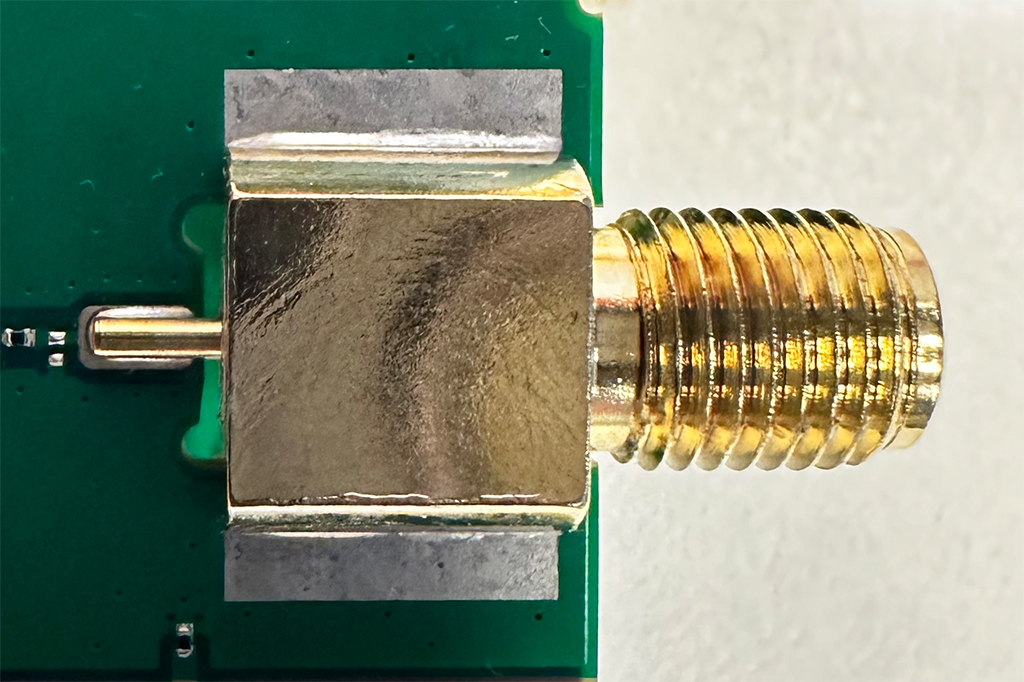 |
Updated design:  | |
| Change reasons | This will improve the effectiveness of device manufacturing. | |
| Affected products information | ||
|---|---|---|
| Model | Affected order codes | Order code changes |
| TRB143 | TRB143 ***** | No changes |
| Upcoming change date | August 2024 | |
| Change impact | ||
|---|---|---|
| Risk assessment | No risk factors are asociated with this change.
Please note: this product change notification does not affect any previous TRB143 devices, except new TRB143 devices that will be manufactured with this change. | |
| Suggested implementation plan |
Information included in this PCN will help adapt to the upcoming changes. For more detailed information, please contact your sales representative. | |
| Acknowledgement of PCN receipt | ||
|---|---|---|
| If no feedback is received within two weeks after the issue date of this notification - Teltonika may accept that this change has been tacitly accepted and can implement the change as indicated above. |
To download the pdf version of this notification, click here.
2024.03.08: Reset button functionality change RutOS 7.07
With the release of RutOS version 7.07, TRB143 device will experience changes related to the security improvements of the device.
| PCN Number: PCN_RUTOS_CHANGE_2024_03_08_EN |
| Change description | |
|---|---|
| Change type | Firmware change |
| Detailed description | Previously, during device resets, logs, RMS connection state data, and SIM PIN settings remained unchanged. However, starting with RutOS firmware version 7.07, all devices will uniformly reset logs, RMS connection state data, and SIM PIN settings to factory defaults when using the reset button. Other reset methods, including WebUI, SMS, and others, will remain unimpacted by this change. |
| Change reasons | Increasing security |
| Affected products information | ||
|---|---|---|
| Model | Affected order codes | Order code changes |
| TRB143 | TRB143 ****** | No changes |
| Upcoming change date | 2024 Q2, with the release of RutOS 7.07 | |
| Change impact | ||
|---|---|---|
| Risk assessment |
| |
| Suggested implementation plan |
Information included in this PCN will help adapt to the upcoming changes. For more detailed information, please contact your sales representative. | |
| Acknowledgement of PCN receipt | ||
|---|---|---|
| If no feedback is received within two weeks after the issue date of this notification - Teltonika may accept that this change has been tacitly accepted and can implement the change as indicated above. |
To download the pdf version of this notification, click here.
2023.10.16: Firmware Requirement Change
Starting from November 2023, all TRB143 devices will be manufactured with a new firmware version. They will require firmware version TRB1_R_00.07.05 or newer.
| Change description | ||
|---|---|---|
| Change type | Firmware Requirement Change | |
| Detailed description | Starting November 2023, all TRB143 devices will be manufactured with a new firmware version. They will require firmware version TRB1_R_00.07.05 or newer. Downgrading to previous firmware versions will no longer be supported.
Please note that this change will be implemented gradually, throughout a 4-month transitional period starting from November 2023. During this period, your shipments of TRB143 may consist of either the previous version or the new one described above. | |
| Change reasons | Support for newest Quectel modem firmware | |
| Affected products information | |
|---|---|
| All TRB143 ****** product codes are affected. No product code changes. | |
| Product release date | November 2023 |
| Change impact | ||
|---|---|---|
| Risk assessment | No risk factors are asociated with this change.
Please note: this product change notification does not affect any previous TRB143 devices, except new TRB143 devices. | |
| Suggested implementation plan |
For more detailed information please contact your sales representative. | |
| Acknowledgement of PCN receipt | ||
|---|---|---|
| If no feedback is received within two weeks after the issue date of this notification - Teltonika may accept that this change has been tacitly accepted and can implement the change as indicated above |
To download the pdf version of this notification, click here.
2023.02.13: MAC address range change
All Teltonika Networks devices manufactured starting from 2023, week 9 will have additional new MAC address range.
| Change description | |
|---|---|
| Change type | MAC address range |
| Detailed description | All Teltonika Networks devices manufactured starting from 2023, week 9 may have a MAC address from the new MAC address range 20:97:27:00:00:00 - 20:97:27:FF:FF:FF, as well as the current MAC address range 00:1E:42:00:00:00 - 00:1E:42:FF:FF:FF |
| Change reasons | Endpoint of the previous MAC address range. |
| Affected products information | ||
|---|---|---|
| Model | Affected order codes | Order code changes |
| All Teltonika Networks devices | All order codes | No changes |
| Upcoming change date | 2023, week 9 | |
| Change impact | ||
|---|---|---|
| Risk assessment | Device install procedures or any automated solutions might need modifications. | |
| Suggested implementation plan |
For more detailed information please contact your sales representative. | |
| Acknowledgement of PCN receipt | ||
|---|---|---|
| If no feedback is received within two weeks after the issue date of this notification - Teltonika may accept that this change has been tacitly accepted and can implement the change as indicated above. |
To download the pdf version of this notification, click here.