Template:Installing openvpn software: Difference between revisions
Created page with "==Step 1: installing OpenVPN software== <ul> <li>The first thing that we'll need to do is install the necessary OpenVPN software. You can download the OpenVPN installer fil..." |
No edit summary |
||
| (3 intermediate revisions by the same user not shown) | |||
| Line 2: | Line 2: | ||
<ul> | <ul> | ||
<li>Download an OpenVPN installer file from <b>[https://openvpn.net/index.php/open-source/downloads.html here]</b>.<br>Run the downloaded file.</li> | |||
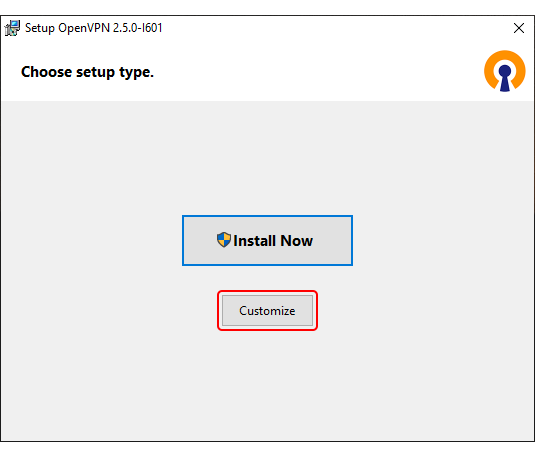
<li>Before starting the installation process, <b>click 'Customize'</b>:<br>[[File:Networking_device_configuration_examples_how_to_generate_tls_certificates_windows_1.png]] | |||
</li> | |||
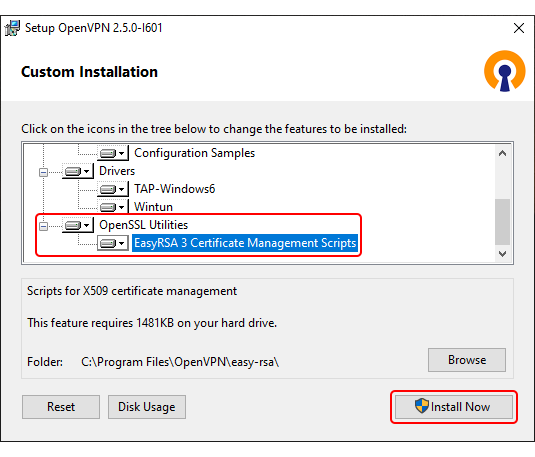
<li>While in the 'Custom Installation' window, scroll down to <b>find OpenSSL Utilities → EasyRSA 3 Certificate Management Scripts</b>; make sure it is installed along with OpenVPN and <b>click 'Install Now'</b>:<br>[[File:Networking_device_configuration_examples_how_to_generate_tls_certificates_windows_2.png]] | |||
</li> | |||
</ul> | </ul> | ||
Latest revision as of 11:19, 29 October 2020
Step 1: installing OpenVPN software
- Download an OpenVPN installer file from here.
Run the downloaded file. - Before starting the installation process, click 'Customize':
- While in the 'Custom Installation' window, scroll down to find OpenSSL Utilities → EasyRSA 3 Certificate Management Scripts; make sure it is installed along with OpenVPN and click 'Install Now':