From Teltonika Networks Wiki
Main Page > TSW Switches > TSW202 > TSW202 Manual > TSW202 LEDsThis wiki page contains information about TSW212 switch LEDs and their actions.
Power LED
The power LED is located on the bottom left corner of the front panel, near the power connector:
File:Networking tsw212 manual panels front v1.png
It can perform two different actions:
| Action |
Description |
| LED turned ON |
Switch is powered up |
| LED turned OFF |
Switch is not power up |
Ethernet port
| No. |
Action |
Describtion |
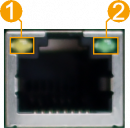 |
| 1 |
Orange LED lit |
10/100 Mbps link established |
| 2 |
Orange LED blinking |
Active link connection |
| 3 |
Green LED lit |
1000 Mbps link established |
|
|
|
SFP port
| No. |
Action |
Describtion |
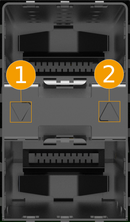 |
| 1 |
Down LED lit |
Lower port link established |
| 2 |
Down LED blinking |
Lower port active traffic |
| 3 |
Up LED lit |
Upper port link established |
| 4 |
Up LED blinking |
Upper port active traffic |
|
|
|



