
RUTM08 Event Juggler
Main Page > RUTM Routers > RUTM08 > RUTM08 Manual > RUTM08 WebUI > RUTM08 Services section > RUTM08 Event Juggler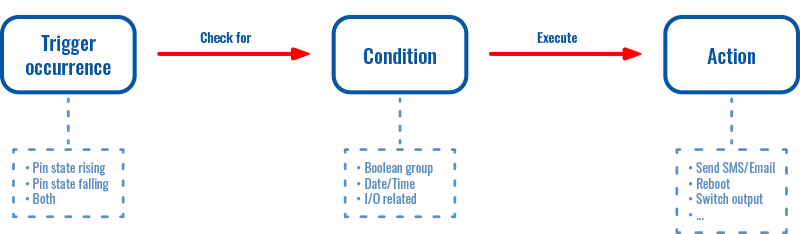
The photo is common to all products. Different products have different event types and action types.
The information in this page is updated in accordance with firmware version RUTM_R_00.07.20.1.
Summary
The Event Juggler is a feature that allows you to create automatic jugglers that perform certain actions when 'event type' changes are detected and 'conditions' are met.

The juggler list is empty by default. To create a new event juggler, look to the Add new event instance at the bottom of the page, enter name and click the 'Add' button:

After this you will be redirected to the event data configuration window.
Event data configuration

| Field | Value | Description |
|---|---|---|
| Enable | off | on; default: on | Enable Event Juggler configuration. |
| Event name | Event Juggler name. | |
| Trigger interval | interger [0..4294967295]; default: none | Specifies the shortest amount of seconds between triggers. The trigger interval and the action's execution delay values are summed up when calculating the total interval between triggers. |
| Event type | Boot | Time | Hotspot | Astronomical time | I/O | Log; default: Not selected | Event that will trigger the rule. |
| Boot mode | Reboot | Power on; default: Reboot | Select the boot mode that will trigger the event. |
| Hours | Select all | hours [0..23]; default: none | Hours when the event should be triggered. If nothing is selected, every hour will be included. |
| Minutes | Select all | minutes [0..59]; default: none | Minutes when the event should be triggered. If nothing is selected, every minute will be included. |
| Months | Select all | months [January..December]; default: none | Months when the event should be triggered. If nothing is selected, every month will be included. |
| Interval type | Weekday | Month day; default: Weekday | Select between week and month days for instance intervals. |
| Interval type: Weekday | Select all | weekday [Monday..Sunday]; default: none | Select between week days for instance intervals. |
| Interval type: Month day - Day of the month | Select all | month day [1..31]; default: none | Month days when the action should be triggered. If nothing is selected, every day of the month will be included. |
| Interval type: Month day - Force last day | off | on; default: off | Force intervals to accept the last day of the month as a valid option if the selected day does not exist in the ongoing month. |
| Trigger | Sunrise | Sunset; default: Sunrise | Astronomical event that will trigger the action. |
| Trigger offset | integer [0..1440]; default: none | Trigger offset in minutes. |
| Longitude | Floating part of number must contain 6 digits (e.g., 25.000000); default: none | Longitude for the Astro Time event. |
| Latitude | Floating part of number must contain 6 digits (e.g., 25.000000); default: none | Latitude for the Astro Time event. |
| Astronomical event type | Official | Civil | Nautical | Astronomical; default: Official | Select the type of astronomical event calculation to use:
|
| I/O pin name | Input (3) | ; default: - | Specify the I/O to which the event is listening. |
| Trigger | Rising | Falling | Both; default: Rising | Specify the condition that will trigger the event. |
| Prevent action execution | off | on; default: off | Prevents execution of actions if the I/O returns to its normal state before the action delay time has elapsed. |
| Events log type | Config change | New DHCP client | Reboot | SSH | Web UI | | Port state | WAN failover (if device supports wired WAN) |Topology changes | FOTA; default: Config change | Type of event that will trigger the action. |
| Events log subtype | There are many subtypes of events. It depends on what features the device supports. | More specific subtype of the event that will trigger the action. |
Action data configuration

| Field | Value | Description |
|---|---|---|
| Action name | string; default: action1 | Action name. |
| Delay | integer [0..4294967295]; default: none | Delay in seconds before the action is executed. |
| Action type | MQTT | Send emaill | HTTP | Lua | Script | Shutdown | RMS | Output | Profile change | Reboot; default: none | The type of action that will be performed. |
| Condition compatibility | And | Or; default: And |
|
| Active conditions | condition list; default: none | All active conditions for the action. |
| Text message | string; default: none | Text parameters to be sent with the message. |
| Topic | string; default: none | MQTT topic used for publishing the data. |
| Server address | Domain names or IP addresses; default: none | Address of the MQTT broker. |
| Port | integer [1..65535]; default: 1883 | Port number of the MQTT broker. |
| Keepalive | integer [0..2147483647]; default: 60 | The number of seconds after which the broker should send a PING message to the client if no other messages have been exchanged in that time. |
| Client ID | string; default: none | Client ID to send with the data. If empty, a random client ID will be generated. |
| QoS | At most once (0) | At least once (1) | Exactly once (2); default: none | MQTT quality of service. Allowed values:
|
| Use credentials | off | on; default: off | Use a username and password for MQTT authentication. |
| Use credentials: on - Username | string; default: none | Username for MQTT authentication. |
| Use credentials: on - Password | string; default: none | Password for MQTT authentication. |
| Use secure connection | off | on; default: off | Enable TLS for a secure connection. Requires certificate files. |
| TLS Encryption Type | Certificate based | Pre-Shared Key based; default: Certificate based | Type of TLS encryption. |
| Certificate based: Allow insecure connection | off | on; default: off | Allow connections without verifying server authentication. |
| Certificate based: Use certificate files from device | off | on; default: off | Choose this option if you want to select certificate files from device. Certificate files can be generated here |
| Certificate based: Certificate authority file | Upload the Certificate Authority (CA) file. Required for verifying the server's certificate. | |
| Certificate based: Client certificate | Upload the client certificate file. This is used for client authentication by the server. | |
| Certificate based: Client private keyfile | Upload the client private key file. This is used along with the client certificate for authentication. | |
| Pre-Shared Key based: Pre-Shared Key | hexadecimal string; default: none | The pre-shared key in hex format. |
| Pre-Shared Key based: Client identity | string; default: none | The pre-shared key in hex format. |
| Subject | string; default: none | Subject of the email. |
| Text message | string; default: none | Body of the email. |
| Sender's email account | list; default: none | Sender's email configuration. Configure email account here |
| Recipient's email address | email; default: none | Email addresses of the recipients. |
| Request method | GET | POST; default: GET | HTTP method to use for the request. |
| Request URL | url; default: none | Destination host URL where data will be sent. |
| Verify | off | on; default: off | Verify the validity of certificates. Only works with HTTPS. |
| Send parameters as | Text parameters | Key-value parameters; default: Text parameters | Choose how to send parameters with the request. |
| Text parameters | string; default: none | Parameters to be sent with the request as text. |
| Key-value parameters | string & list; default: none | Parameters to be sent with the request as key-value pairs. |
| Timeout | integer [0..3600]; default: none | Timeout for the request in seconds. |
| Custom HTTP headers | string; default: none | Custom headers for the HTTP requests. |
| Use secure connection | off | on; default: off | Enable TLS for a secure connection. Requires certificate files. |
| Use secure connection: Use certificate files from device | off | on; default: off | Choose this option if you want to select certificate files from device. Certificate files can be generated here |
| Use secure connection: Certificate authority file | Upload the Certificate Authority (CA) file. Required for verifying the server's certificate. | |
| Use secure connection: Client certificate | Upload the client certificate file. This is used for client authentication by the server. | |
| Use secure connection: Client private keyfile | Upload the client private key file. This is used along with the client certificate for authentication. | |
| Lua action example script | -(interactive button) | Downloads Lua action example script. |
| File | -(interactive button) | Upload a Lua script file to be executed. |
| Script file type | Upload | Path; default: Upload | Choose whether to upload a file directly or specify a file path. |
| Script file | -(interactive button) | Upload the script file to be executed. |
| Script file path | string; default: none | Enter the full path to the script file. |
| Send arguments as | Text parameters | Key-value parameters; default: Text parameters | Choose how to send arguments: as text or key-value pairs. |
| Text arguments | string; default: none | Arguments to be sent to the script as text. |
| Key-value arguments | string & list; default: none | Arguments to be sent to the script as key-value pairs. |
| RMS state | off | on; default: off | Turn the RMS state on or off. |
| Profile name | list; default: default | Name of the profile to be applied. |
| Control mode | Invert | Copy | Set; default: Invert | Select the control mode for the output pin. This determines how the pin will be controlled: inverted, copied, or set to selected state. |
| Control pin | Output (4) | ; default: Output (4) | Select the output or relay whose state will be changed. |
| Control mode: Copy - Copy pin state | list of pins; default: | Copy the state from the selected input to the selected output. |
| Control mode: Set - Set pin state | for Output - Low | High, for relay - Closed | Open; default: Low | Set the output state. |
| Revert state | integer [0..2147483647]; default: 0 | Number of seconds after which the state will revert. If set to 0 or left empty, the state will not revert. |
| Maintain state | off | on; default: off | Maintain the current IO state after a reboot. |
Conditions
Conditions can be added with data configuration setup or after setup on the event juggler main page.

| Field | Value | Description |
|---|---|---|
| Condition name | string; default: condition1 | Condition name. |
| Condition type | Lua | I/O | Boolean group | Time; default: Not selected | Condition type. |
| Lua condition example script | -(interactive button) | Downloads Lua condition example script. |
| File | -(interactive button) | Upload a Lua script file. |
| I/O pin name | Input (3) | ; default: | Specify the I/O to which the condition is listening. |
| Pin state | for Output - Low | High, for relay - Closed | Open; default: Low | Specify the state the pin must be in. |
| Boolean operator | And | Or; default: And |
|
| Invert results | off | on; default: off | Invert the evaluation results of the boolean group. |
| List of conditions | list; default: none | List of conditions that will be evaluated. |
| Interval type | Weekday | Month day | Year day; default: Weekday | Select between week, month, and year days for instance intervals. |
| Interval type: Weekday - Weekday | Select all | weekday [Monday..Sunday]; default: none | Weekdays when the action should be triggered. If nothing is selected, every day of the week will be included. |
| Interval type: Month day - Month day | Select all | month day [1..31]; default: none | Month days when the action should be triggered. If nothing is selected, every day of the month will be included. |
| Interval type: Month day - Force last day | off | on; default: off | Force intervals to accept the last day of the month as a valid option if the selected day does not exist in the ongoing month. |
| Interval type: Year day - Start year day | integer [1..366]; default: none | Start day number of the year for the interval when the action should be triggered. |
| Interval type: Year day - End year day | integer [1..366]; default: none | End day number of the year for the interval when the action should be triggered. |
| Interval type: Year day - Start hour and minute | Accepted formats are hh:mm or *:mm, where * is a wildcard for any hour; default: none | Start time in the format hh:mm for the interval when the action should be triggered. Use a 24-hour format (00:00 - 23:59). |
| Interval type: Year day - End hour and minute | Accepted formats are hh:mm or *:mm, where * is a wildcard for any hour; default: none | End time in the format hh:mm for the interval when the action should be triggered. Use a 24-hour format (00:00 - 23:59). |
| Invert value | off | on; default: off | Invert the condition value. |