
Template:Rms manual rms move credits
Move RMS resources
From Companies page
To move RMS Credits or Management/Connection data packs go to Companies page under Administration section.
- In the Companies Page and click on
 and select Move resources.
 - In Move resources action window select:
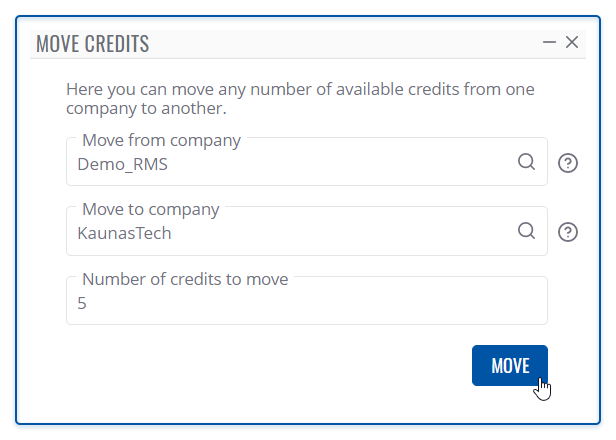
- Type of resource you will be moving ( Credit / Management pack / Connect data pack).
- Company from which you will be moving resources.
- Company to which you will move the selected resource.
- Amount of resources you will move.
- Click on Move button to execute the action.


At the top of your screen, you will get a notification: Move operation completed successfully.
From Company details page
- In the Companies Page click on View company details
 .
. - Navigate to Resources tab and open Resources section.

- Click on and select Move resources.
- In Move resources action window select:
- Type of resource you will be moving ( Credit / Management pack / Connect data pack).
- Company from which you will be moving resources.
- Company to which you will move the selected resource.
- Amount of resources you will move.
- Click on Move button to execute the action.


At the top of your screen, you will get a notification: Move operation completed successfully.
From Resources page

- In the Resources Page and click on and select Move resources.
- In Move resources action window select:
- Type of resource you will be moving ( Credit / Management pack / Connect data pack).
- Company from which you will be moving resources.
- Company to which you will move the selected resource.
- Amount of resources you will move.
- Click on Move button to execute the action.
At the top of your screen, you will get a notification: Move operation completed successfully.